Showing posts with label launcher. Show all posts

Sunday, September 8, 2013

Windows8 Windows 8 +Launcher v1.9 APK ( 6Mb )


စက္တင္ဘာ ၆ရက္ေန႔ကမွ အပ္တိတ္ ထြက္လာတာေလးပါ  

Luncher ေကာင္းေကာင္းေလးကို ေပါ့ေပါ့ ပါးပါးသံုးခ်င္သူမ်ားအတြက္ အရမ္းမိုက္ပါတယ္ 

 Windows8 / Windows 8 +Launcher
Features:

  • Live tiles for gmail, news, weather, twitter, calendar , etc with many configuration options

  • Drag and drop tile groups to re-order/change the position of tiles.

  • Change icon/tile icon size using Menu >> Icon Size 

  • Select the preferred country for news using Menu >> Prefs >> News Country and for stock market using Menu >> Prefs >> Stock Market 

  • Power Control widget to on/off Wifi, Airplan mode, Bluetooth, ring mode, screen brightness, etc.

  • Click on icon/tile will bring up (launch) the associated app, (This application will try to associate most common applications like dialer, messsage, google play, etc) if you are clicking first time and no application is associated then list of all installed apps will be opened and you can associate any app of your wish to this tile.

  • Long Click on icon/tile to change the color, icon, application associated to tile. Following 3 options are available\n * Associate App - Change the launching app while keeping the same icon on home screen.\n * Change Color - Change background color of tile.\n * Change App - Change the launching app and icon will be replaced with app default icon on home screen. 

  • Additional icons/tiles style which can be customized as per your need. Add/remove tiles from Menu >> Tiles

  • Weather Service : Based on your current location, local weather details are available.

  • Stock Market updates : Select your preferred Stock Market using Menu >> Misc >> Stock Market 

    DOWNLOAD LINK

     PYAE PHYO 

    ANDROID USER အေပါင္း စိတ္ခ်မ္းေျမ့ၾကပါေစ ............


Friday, August 2, 2013

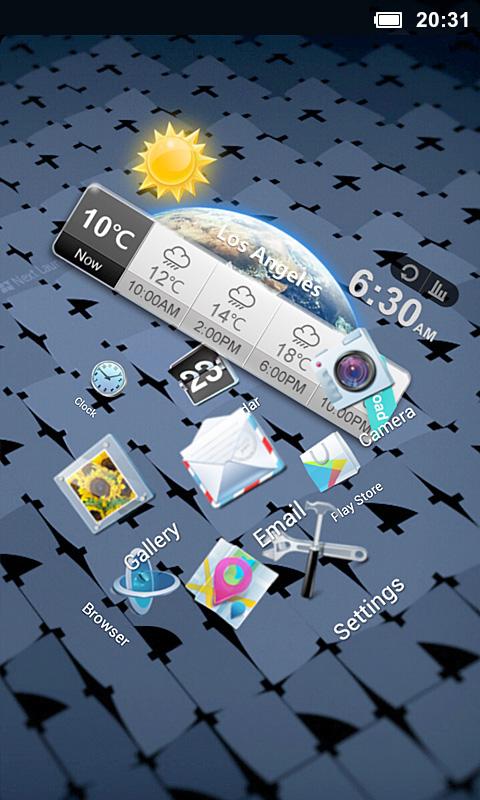
Next Launcher 3D v1.52

Next Launcher 3D - screenshot

August 1, 2013 ရက္ေန ့က update ထြက္လာတဲ့ next launcher ေလးပါ...
new future မ်ားပါဝင္လာတာေအာက္မွာၾကည့္ရွဳနိုင္ပါသည္...
လွပဆန္းသစ္တဲ့ next launcher update ေလးတင္လိုက္ရေအာင္ဗ်ာ ... :D

Testimonials
“One of the most heavily customizable, fluid, and striking launchers we’ve ever seen here at Redmond Pie.” - Redmond Pie
“A gorgeous app packed with dynamic effects and 3D elements. The gratifying 3D visual elements, transition effects, and gestures will get you a different and brilliant visual enjoyment and operation experience.” - Topapps
“The launcher features crazy 3D effects, turning any device you own into a futuristic Tron-centric trip. With additional themes and custom widgets downloadable from Google Play, it’s an extensive and extremely comprehensive option for someone looking to spice up their device.” - Droid-life
Key Features
- Extremely fancy 3D effect with buttery smooth experience
- Real 3D Home Screen Transition Effects (Crystal, Cloth, Folding and more coming soon)
- Stunning 3D screen preview with dazzling animation of screen switching
- Build unique icon style by changing its size, angle, style and label (Icon Editor)
- Combine all good parts from different themes into a single theme you really love (Theme Mix Mode)
- Efficient and powerful batch apps management with gestures
- Up to 8 different gestures available in home screen and app drawer
- See how cool your phone could be by blowing all the icons and the widgets to air space (Floating Mode)
- Enhanced shining border effects for home screen transition
- Up to 7 rows on dock to shortcut all your favorites
- Keep releasing 3D Next widgets, 3D themes and live wallpapers special designed by GO Launcher Dev Team
Watch Next Launcher 3D demo.
 

Updated
Size
7.2M
Current Version
1.52
Requires Android
2.2 and up 
 
Next Launcher 3D - screenshot Next Launcher 3D - screenshot
Next Launcher 3D - screenshot

download links

 
(OR)


thank for all
YEMIN7